MD2 for map.apps | Eclipse plug-in
MD² (MD2) is a model-driven framework for cross-platform development of mobile applications. Based on a textual DSL, MD2 generates runnable native apps for Android and iOS. MD2 has been developed by the Group for Practical Computer Science at the Department of Information Systems, University of Münster. The initial version of the framework is available at http://wwu-pi.github.io/md2-web/ (including the source code for iOS and Android generators as well as Podcasts).
In my master thesis the MD2 approach was enhanced and a generator for the map.apps platform was developed. The current version available on this page only executes generators for the map.apps platform and a backend stub. The iOS and Android generators are not supported for the current language version of MD2 that now comes with a more powerful expression language, improved workflows and a more sophisticated datatype-oriented view on input elements and the according validators.
Installation
This short step-by-step guide explains how to install the MD2 Eclipse plug-ins. All dependencies (required Xtext and Xtend bundles) are installed automatically. As MD2 is an Eclipse plug-in, you have to install Eclipse first. Get Eclipse...
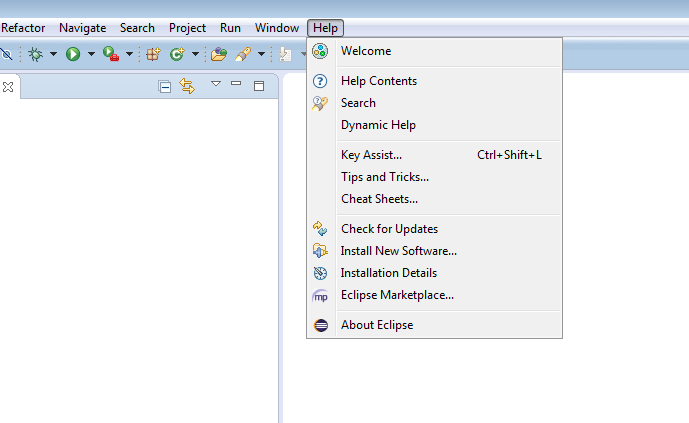
Select 'Help' -> 'Install New Software...'.

Click the 'Add...' button to add a new plug-in repository.

Enter the repository URL as shown.
Name: MD2 Framework
Location: http://md2.soerenevers.de/plugin/
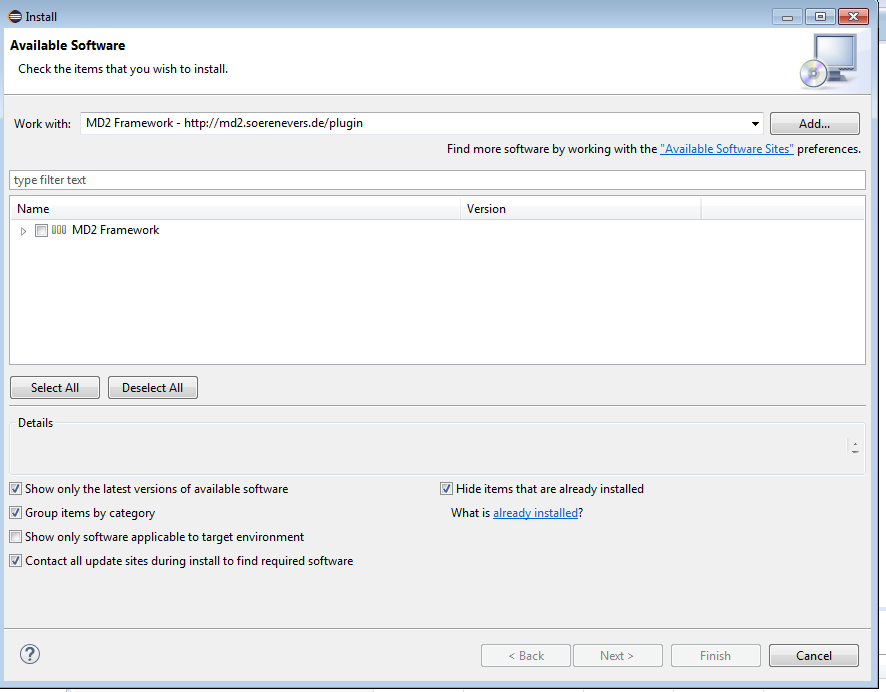
Choose the added MD2 Framework repository.
Click 'next'.
After you accepted the license the MD2 plug-ins and all dependencies are installed.
After a restart of Eclipse the MD2 development environment is available.
Getting started
- Create a new MD2 project: 'File' -> 'New' -> 'Other...' -> 'Other' -> 'MD2 Project'.
- The new MD2 language version with the latest syntax is not documented yet. Read the documentation of the previous version on http://wwu-pi.github.io/md2-web/ to get started.